Updated: November 2026.
Many restaurant owners look for an ordering app for their restaurant. That can mean three different things: a marketplace delivery app, your own ordering site that works like an app, or your own app in the App Store. This guide shows the differences, the costs and the questions to ask every provider. With real numbers from our own price list.
The short answer
- For most restaurants, your own ordering site is enough. Guests order in the browser and download nothing.
- A marketplace brings new guests but usually takes a commission per order. The marketplace keeps the customer data.
- Your own App Store app pays off mainly for regulars who order often. It takes more work.
- "Free" almost never means no cost. Ask about card fees, commission and setup.
Three kinds of ordering apps compared
| Marketplace app | Own ordering site (web app) | Own App Store app | |
|---|---|---|---|
| Download needed | yes, the marketplace app | no, runs in the browser | yes |
| Typical cost | commission per order | monthly fee or percent per order | setup plus running costs |
| Customer data | with the marketplace | with you | with you |
| Where new guests come from | the marketplace | Google, your website, QR codes | mostly regulars |
| Your brand | one of many | your name, your design | your name, your design |
The options are not exclusive. Many restaurants stay on a marketplace and move regulars to their own ordering site.
Web app or App Store app?
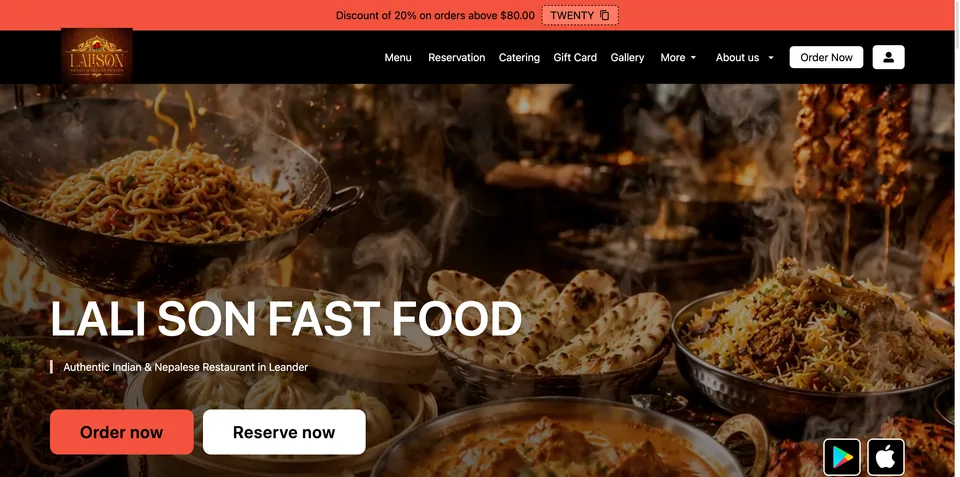
An ordering site is a website that works like an app on a phone. Guests open a link, scan a QR code or come from Google. On iPhone and Android they can save the page to the home screen. Then it looks like an app.
An App Store app must be found and installed first. Few guests do that for a single order. For regulars who order every week it can pay off, for example with loyalty points in the app.
Our advice: start with your own ordering site. Think about an App Store app only when a large share of your orders comes from regulars.
Is there a free ordering app?
Some providers advertise a free ordering app. Check where the costs are instead:
- card fees per payment, often with a markup
- commission or a service fee per order
- fees for setup, a domain or extra features
- ads or links to other restaurants on your ordering page
Use your own numbers: how much do you sell online each month? Only then can you see which model costs less.
Worked example with Fleksa prices
With Fleksa, guests get an ordering site in your brand, for pickup and delivery. Prices exclude sales tax.
- Online ordering only: $99 a month or 10% per eligible order.
- Flex: 10% of eligible online orders (your website and Google) plus $0.50 per reservation, at least $49 a month.
- Fix: $199 a month with 0% Fleksa commission, with website, online ordering, POS, kitchen display, QR ordering, reservations and loyalty.
Example: online ordering only, monthly fee against percent.
| Online sales per month | 10% per order | Monthly fee | Cheaper |
|---|---|---|---|
| $500 | $50 | $99 | percent |
| $990 | $99 | $99 | same |
| $2,000 | $200 | $99 | monthly fee |
| $5,000 | $500 | $99 | monthly fee |
The table compares the Fleksa fee only, with no card fees, hardware or add-ons. The line is at $99 ÷ 10% = $990 in online sales a month. Your quote confirms the terms. A branded App Store app is available on request.
Checklist for choosing a provider
- What does an order cost: commission, percent or a flat monthly fee?
- Which card fees apply, and who gets them?
- Do guests have to download something, or do they order in the browser?
- Do you own the customer data? Can you contact guests yourself when they agreed to it?
- Does the ordering site run under your name and your domain?
- Do orders from your website, Google and delivery apps arrive on one device?
- Can guests order at the table with a QR code?
- How long is the contract, and how do you cancel?
Ask every provider these questions in writing. How it works at Fleksa: Restaurant online ordering system and QR ordering at the table. All prices: Plans and prices.
Frequently asked questions
How much does an ordering app for a restaurant cost?
It depends on the model: commission per order, percent or a flat monthly fee. At Fleksa, online ordering on its own costs $99 a month or 10% per eligible order, plus card fees. On the Fix plan at $199 a month you pay 0% Fleksa commission.
Do I need my own App Store app?
Usually not. An ordering site in the browser reaches every guest without a download. Your own app pays off mainly when many regulars order often.
What is the difference between an ordering app and a delivery marketplace?
A marketplace shows many restaurants in its own app and usually takes a commission. Your own ordering app or ordering site shows only your restaurant. The customer data stays with you.
Can I use a marketplace and my own ordering site together?
Yes. With Fleksa, orders from supported delivery apps can arrive on one tablet with the integration pass, where available. Ask which apps are available for your location.
More on costs without commission: Commission-free online ordering.