Updated: November 2026.
A reservation system replaces the booking book next to the phone. Guests book online, and your team sees every table in one place. This guide shows which features a restaurant really needs, how the pricing models work, and which questions to ask every provider. With real numbers from our own price list.
The short answer
- A cloud reservation system runs in the browser. You need no server of your own, and you see bookings on any device.
- Three booking channels matter: your website, Google (Search and Maps), and phone or walk-in guests. All three should land in one list.
- There are three pricing models: a fee per cover or per booking, a flat monthly fee, or a bundle with other tools.
- With few bookings, a per-booking model is often cheaper. With many bookings, a flat monthly fee wins.
What a reservation system must do
| Feature | Why it matters |
|---|---|
| Booking on your own website | Regulars book where they already find you. No platform sits in between. |
| Reserve with Google | Guests book straight from Google Search and Google Maps, without opening your website. |
| Manual bookings | Phone and walk-in guests belong in the same list. Otherwise you get double bookings. |
| Time slots and capacity | You set how many tables are free per slot and how long a table stays taken. |
| Party rules | Minimum and maximum party size, and how far ahead guests can book. |
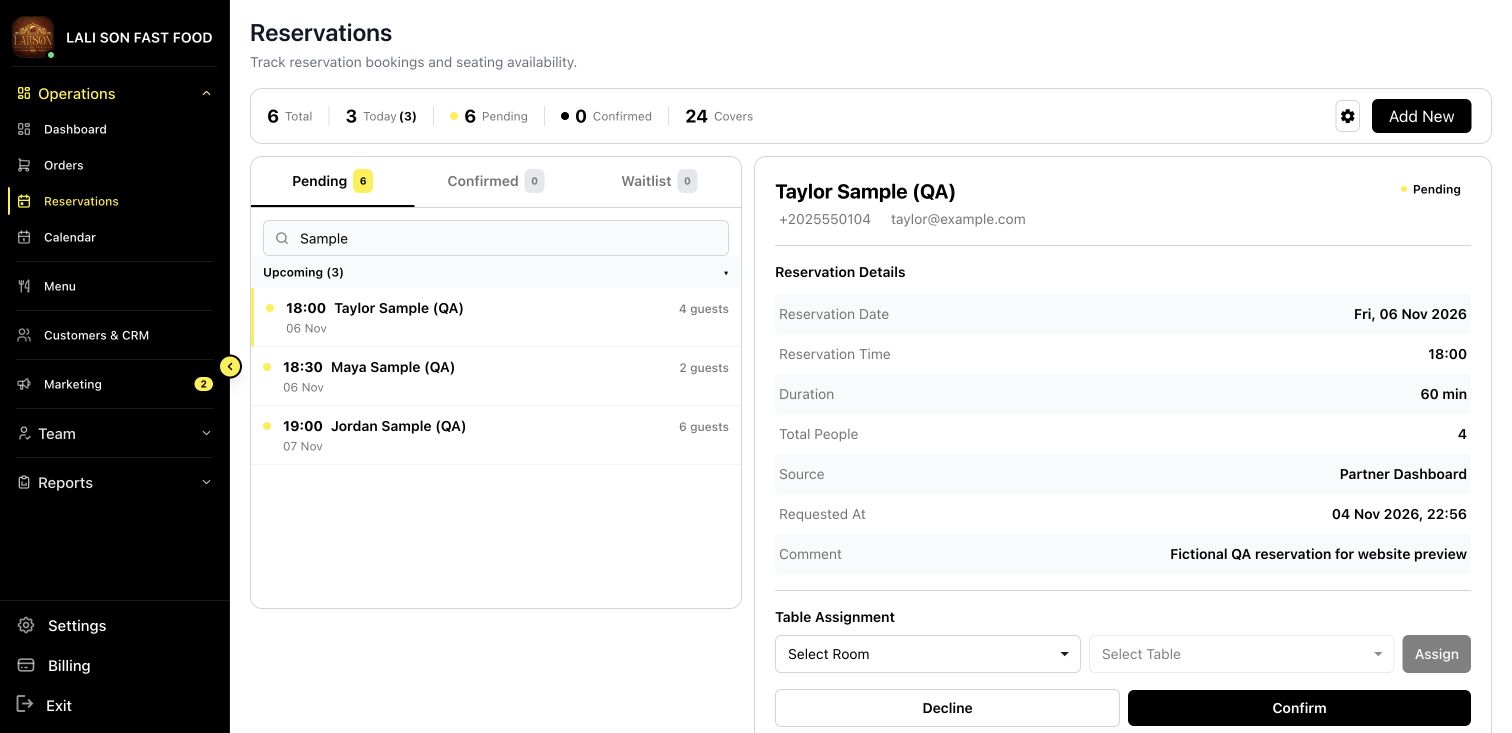
| Status per booking | Pending, confirmed, seated, completed, cancelled. Your team sees at once what is coming. |
| Floor plan | Which table is free, reserved or occupied? This helps during a busy service. |
| Confirmation to the guest | The guest knows the booking arrived. Ask whether it goes by email, SMS or both. |
Cloud or installed on site?
An installed program runs on one computer in the restaurant. If that computer fails, nobody can reach the bookings. A cloud system stores the data with the provider. You open it in the browser, on the tablet at the host stand or on your phone at home. Online bookings from your website and Google need an internet connection anyway. That is why almost all current restaurant systems are cloud systems.
Still ask: where is the data stored, and is there a data processing agreement? Guest names and phone numbers are personal data.
Three pricing models
| Model | How you pay | Fits when |
|---|---|---|
| Per cover or per booking | An amount for each online booking or each guest, often with a base fee | You get few online bookings |
| Flat monthly fee | A fixed amount, unlimited bookings | Guests book your tables online every day |
| Bundle with other tools | Reservations together with website, online ordering or POS | You want several tools from one provider |
Use your own numbers: how many online bookings do you get per month, and how many guests per booking? Only then can you compare offers.
Worked example with Fleksa prices
Reservations are included in both Fleksa plans, together with website, online ordering, POS, kitchen display, QR ordering, loyalty and marketing. Reserve with Google is included in both plans. Prices exclude sales tax.
- Flex: 10% of eligible online orders plus $0.50 per reservation, at least $49 a month.
- Fix: $199 a month, unlimited reservations, no fee per booking.
- Reservations only: $49 a month or $0.50 per reservation.
Example: a restaurant that uses the plans for reservations only, with no online orders.
| Reservations per month | Flex | Fix | Cheaper |
|---|---|---|---|
| 50 | $49 (minimum) | $199 | Flex |
| 200 | $100 | $199 | Flex |
| 398 | $199 | $199 | same |
| 600 | $300 | $199 | Fix |
The table compares base plan fees only, with no card fees, hardware or add-ons. Up to 98 reservations a month, the Flex minimum of $49 applies. The line to Fix is at $199 ÷ $0.50 = 398 reservations. If you also take online orders, 10% of those orders goes into the Flex calculation. Then Fix pays off sooner.
Checklist for choosing a provider
- What does a booking cost? Is there a fee per cover, per booking, or a flat monthly fee?
- Do bookings from your website, Google and phone land in the same list?
- Does Reserve with Google cost extra?
- How does the guest get a confirmation: email, SMS or both? How many SMS are included?
- Can you take deposits or hold a card for large parties?
- Do you own the guest data?
- Can your team see reservations at the POS?
- How long is the contract, and how do you cancel?
Ask every provider these questions in writing. How it works at Fleksa: Restaurant reservation system. All prices: Plans and prices.
Frequently asked questions
How much does a restaurant reservation system cost?
It depends on the pricing model: per cover, per booking or a flat monthly fee. At Fleksa, reservations on their own cost $49 a month or $0.50 per reservation. On the Fix plan at $199 a month, reservations are unlimited.
What is a cloud reservation system?
A system that runs in the browser. The data is stored with the provider, not on a computer in the restaurant. You see bookings on any device with an internet connection.
Can guests book directly on Google?
Yes, if your system supports Reserve with Google. Guests then book from Google Search and Google Maps. At Fleksa this is included in both plans. Our team confirms availability for your restaurant.
Which reservation system fits a small restaurant?
With few online bookings, a per-booking model or a low monthly minimum usually fits. Check that website, Google and phone bookings land in one list. In a small team, that saves the most time.
More on online ordering costs: Commission-free online ordering.